MOFAOR Meetings Demo
Independent Demonstration Disclosure: MOFAOR Meetings Demo is an independent software demonstration engineered and maintained by SafeNet Creations PVT LTD. It is not an official government application, is not affiliated with or endorsed by any Ministry, and does not connect to official government systems. Evaluators can launch an isolated 7-day sample workspace without an email or password to test executive meeting agendas, action-item tracking, and encrypted minutes workflows in English, Sinhala, and Tamil.
About MOFAOR Meetings Demo & How to Use
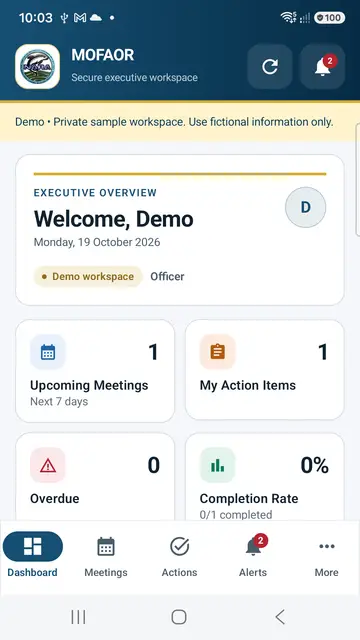
MOFAOR Meetings Demo (lk.gov.mofaor.meetings) showcases how multi-department organisations can coordinate meeting schedules, track action completion rates, receive in-app alerts, and test encrypted audio recording using strictly fictional sample records.
How It Works
Start a Private Sample Workspace
Accept the demo rules and launch an isolated guest officer workspace with fictional sample meetings—no email or password required.
Review Meetings & Agendas
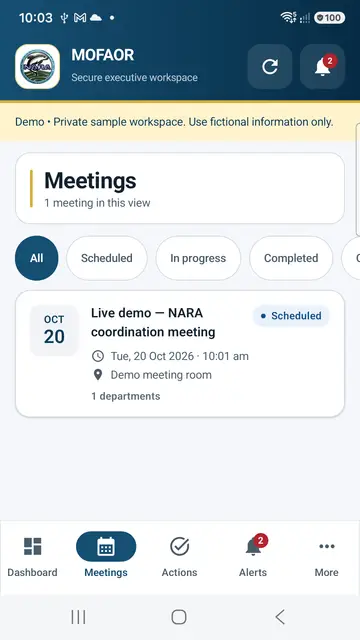
Filter upcoming, in-progress, and completed coordination meetings with department tags, room details, and agenda items.
Update Action Progress
Move assigned action items from pending to in-progress or completed and watch real-time completion metrics update on the dashboard.
Test Recording & One-Tap Reset
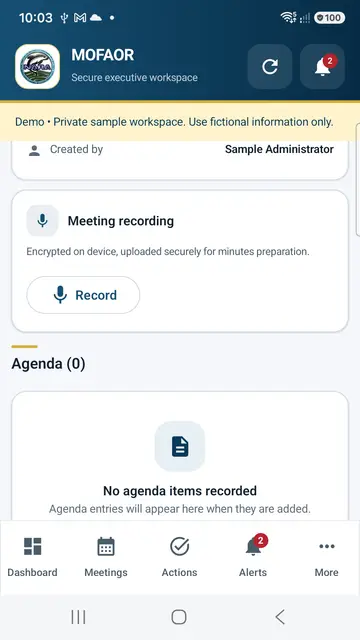
Test optional microphone recording with synthetic audio, and tap Delete My Demo Workspace anytime in Settings (workspaces auto-expire after 7 days).
Key Capabilities
🏛️ Isolated Sandbox Per Tester
Other public testers cannot view or modify your private sample workspace; guest data expires automatically after 7 days.
🎙️ Encrypted Audio Workflow
Demonstrates on-device recording encryption and secure upload pipelines for minutes preparation.
🌐 Trilingual Executive UI
Switch seamlessly between English, Sinhala (සිංහල), and Tamil (தமிழ்) across dashboards, agendas, and action cards.
🗑️ Instant Self-Service Deletion
Built-in Delete My Demo Workspace control immediately removes your guest identity, sample notes, and test recordings.
User & Reviewer Support (English)
- Google Play: lk.gov.mofaor.meetings
- Companion Web: mofaor-meetings-demo.web.app
- Developer Support: info@safenetcreations.com · +94 70 566 7755
- Privacy Policy: safenetcreations.com/privacy/mofaor-meetings/
Independent Demo & Enterprise Licensing
Maintained independently by SafeNet Creations PVT LTD as a software capability showcase (not an official Ministry system). Do not enter personal or confidential records in the demo.
MOFAOR Meetings Demo භාවිත කරන ආකාරය
ස්වාධීන නිදර්ශන දැනුම්දීම: MOFAOR Meetings Demo යනු SafeNet Creations PVT LTD විසින් පවත්වාගෙන යනු ලබන ස්වාධීන මෘදුකාංග නිදර්ශනයකි. මෙය නිල රජයේ යෙදුමක් නොවන අතර කිසිදු අමාත්යාංශයකට අනුබද්ධ නොවේ. කල්පිත දත්ත පමණක් භාවිත කරමින් රැස්වීම් න්යාය පත්ර, ක්රියාමාර්ග ප්රගතිය සහ හඬ පටිගත කිරීම් සිංහල, දෙමළ සහ ඉංග්රීසි භාෂාවලින් පරීක්ෂා කළ හැක.
පුද්ගලික Demo අවකාශය අරඹන්න
විද්යුත් තැපෑලක් හෝ මුරපදයක් නොමැතිව දින 7ක පුද්ගලික පරීක්ෂණ වැඩබිමක් ආරම්භ කරන්න.
රැස්වීම් සහ න්යාය පත්ර
ඉදිරි සහ අවසන් කළ රැස්වීම් කාලසටහන් සහ න්යාය පත්ර පරීක්ෂා කරන්න.
ක්රියාමාර්ග යාවත්කාලීන කරන්න
පවරා ඇති කාර්යයන්හි ප්රගතිය සටහන් කර Dashboard ප්රතිශත බලන්න.
ක්ෂණික දත්ත මකාදැමීම
Settings තුළ ඇති Delete my demo workspace මඟින් ඕනෑම මොහොතක පරීක්ෂණ දත්ත ඉවත් කරන්න.
MOFAOR Meetings Demo பயன்படுத்தும் முறை
சுயாதீன மாதிரிச் செயலி அறிவிப்பு: MOFAOR Meetings Demo என்பது SafeNet Creations PVT LTD ஆல் பராமரிக்கப்படும் சுயாதீன மென்பொருள் செயல்விளக்கமாகும். இது அதிகாரப்பூர்வ அரசாங்கச் செயலி அல்ல; எந்த அமைச்சகத்துடனும் தொடர்புடையது அல்ல. மாதிரித் தரவுகளை மட்டும் பயன்படுத்தி கூட்ட நிகழ்ச்சி நிரல்கள், பணி முன்னேற்றம் மற்றும் குரல் பதிவு வசதிகளை தமிழ், சிங்களம் மற்றும் ஆங்கிலத்தில் பரிசோதிக்கலாம்.
தனிப்பட்ட மாதிரிப் பணியிடம்
மின்னஞ்சல் அல்லது கடவுச்சொல் இன்றி 7-நாள் தனிப்பட்ட மாதிரிப் பணியிடத்தைத் தொடங்கவும்.
கூட்டங்கள் & நிகழ்ச்சி நிரல்
திட்டமிடப்பட்ட மற்றும் நிறைவடைந்த கூட்ட விவரங்களைத் துறை வாரியாகப் பார்க்கவும்.
பணி முன்னேற்றப் பதிவு
ஒதுக்கப்பட்ட பணிகளின் நிலையைப் புதுப்பித்து நிறைவு வீதத்தைக் காணவும்.
உடனடித் தரவு நீக்கம்
Settings-இல் உள்ள Delete my demo workspace மூலம் உங்கள் மாதிரித் தரவுகளை எப்போது வேண்டுமானாலும் நீக்கலாம்.