
MyTracksy Staff
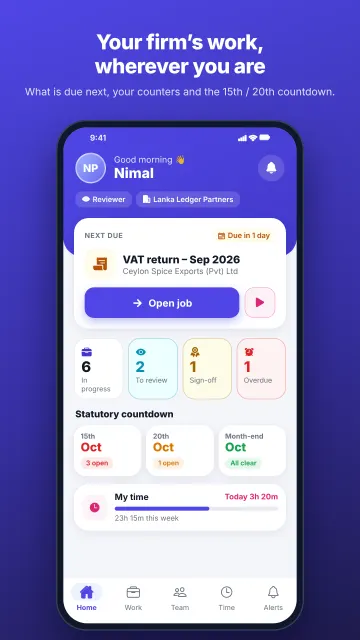
The mobile companion for staff at accounting firms that run MyTracksy FirmOS. See what is due, move client jobs forward, track billable time, countdown to 15th/20th/month-end statutory deadlines and close filings with RAMIS, EPF/ETF or eROC references from your phone.
About MyTracksy Staff & How to Use
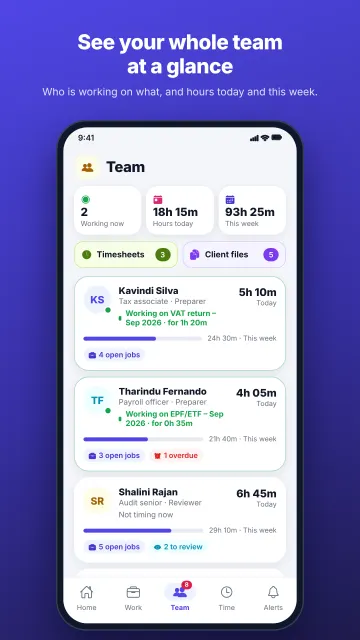
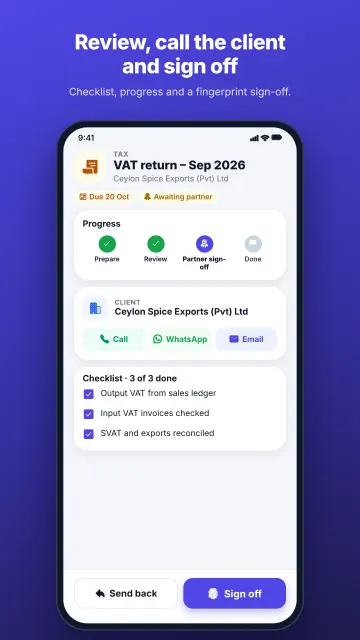
MyTracksy Staff keeps accounting, tax and company-secretarial teams aligned with their MyTracksy FirmOS workspace. Audit associates, tax officers and managers can inspect job checklists, see items waiting for review or sign-off, upload acknowledgement photos and contact clients via phone or WhatsApp with full job context.
How to Use (Step-by-Step)
Check Statutory Countdowns
Open Home to see your next job due and the 15th, 20th and month-end Sri Lankan statutory filing countdowns.
Move Client Jobs Forward
View jobs in progress, waiting for review, waiting for sign-off or overdue, and tick off checklist items.
Log RAMIS, EPF/ETF & eROC
Close completed filings by recording the RAMIS, EPF/ETF or eROC reference number and snapping the acknowledgement slip.
Track Time & Follow Up
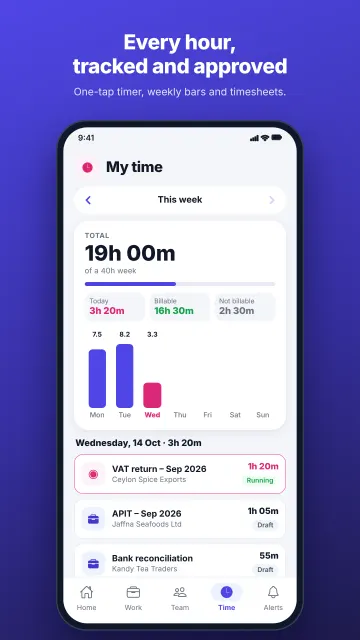
Log time spent on client engagements and call or WhatsApp client contacts directly from the job screen.
Key Features
📅 Statutory Filing Timers
Built-in countdowns for 15th, 20th and month-end tax and payroll statutory deadlines.
✅ Checklist & Sign-Off Flow
Structured stages from work-in-progress to manager review and partner sign-off.
🧾 Filing Reference Capture
Attach RAMIS, EPF/ETF and eROC reference numbers with photo proof of submission.
🔄 Real-Time FirmOS Sync
Instant synchronization with the firm’s MyTracksy FirmOS web practice platform.
User & Reviewer Support (English)
- Google Play: com.mytracksy.staff
- Email Support: info@safenetcreations.com
- Phone / WhatsApp: +94 70 566 7755 (070 566 7755)
- Privacy Policy: safenetcreations.com/privacy/mytracksy-staff/
Support & Account Help
Need help linking your workspace or migrating records? Message our support desk on WhatsApp at +94 70 566 7755.
MyTracksy Staff (මයිට්රැක්සි ස්ටාෆ්) භාවිත කරන ආකාරය
MyTracksy FirmOS භාවිත කරන ගිණුම්කරණ සහ විගණන ආයතනවල කාර්ය මණ්ඩලය සඳහා නිර්මාණය කළ ජංගම යෙදුමකි. නියමිත කාර්යයන්, 15 සහ 20 වැනිදා නීතිමය බදු දින ගණනයන්, RAMIS / EPF / ETF / eROC යොමු අංක සහ කාල සටහන් ඔබේ දුරකථනයෙන්ම කළමනාකරණය කරන්න.
නියමිත දින සහ කාර්යයන් බලන්න
මුල් තිරයෙන් ඊළඟට අවසන් කළ යුතු කාර්යයන් සහ 15, 20 හා මාස අවසාන බදු දින ගණනයන් බලන්න.
කාර්ය පිරික්සුම් ලැයිස්තු යාවත්කාලීන කරන්න
ක්රියාත්මක වන, පරීක්ෂාවට යොමු කළ සහ අනුමැතිය අපේක්ෂිත කාර්යයන් පියවරෙන් පියවර ඉදිරියට ගෙන යන්න.
RAMIS, EPF/ETF සහ eROC යොමු එක් කරන්න
ගොනු කිරීම් අවසන් කළ පසු අදාළ යොමු අංකය සහ ලදුපත් ඡායාරූපය අමුණන්න.
කාලය සටහන් කර සේවාදායකයින් අමතන්න
එක් එක් කාර්යය සඳහා වැය කළ කාලය සටහන් කර දුරකථන හෝ WhatsApp මඟින් සේවාදායකයින් සම්බන්ධ කරගන්න.
පරිශීලක සහාය (සිංහල)
- විද්යුත් තැපෑල: info@safenetcreations.com
- දුරකථන / WhatsApp: +94 70 566 7755 (070 566 7755)
- පෞද්ගලිකත්ව ප්රතිපත්තිය: safenetcreations.com/privacy/mytracksy-staff/
MyTracksy Staff (மைட்ராக்ஸி ஸ்டாஃப்) பயன்படுத்தும் முறை
MyTracksy FirmOS பயன்படுத்தும் கணக்கியல் மற்றும் தணிக்கை நிறுவனங்களின் ஊழியர்களுக்கான கைபேசிச் செயலி. நிலுவையிலுள்ள பணிகள், 15/20/மாத இறுதிச் சட்டப்பூர்வ காலக்கெடுக்கள், RAMIS / EPF / ETF / eROC குறிப்பு எண்கள் மற்றும் நேரப் பதிவுகளை உங்கள் கைபேசியிலிருந்தே நிர்வகிக்கலாம்.
காலக்கெடு & பணிகளைப் பார்க்கவும்
முகப்புத் திரையில் அடுத்த பணி மற்றும் 15, 20, மாத இறுதிச் சட்டப்பூர்வ காலக்கெடுக்களைப் பார்வையிடவும்.
பணிப் பட்டியலை முன்னகர்த்தவும்
நடைபெறும் பணிகள், மீள்பார்வை மற்றும் ஒப்புதலுக்காகக் காத்திருக்கும் பணிகளைப் படிப்படியாக முடிக்கவும்.
RAMIS, EPF/ETF & eROC பதிவு
பணியை முடிக்கும்போது RAMIS, EPF/ETF அல்லது eROC குறிப்பு எண்ணையும் ஒப்புகைச்சீட்டுப் படத்தையும் இணைக்கவும்.
நேரப் பதிவு & வாடிக்கையாளர் தொடர்பு
பணி நேரத்தைப் பதிவு செய்து வாடிக்கையாளர்களை அழைப்பு அல்லது WhatsApp மூலம் உடனடியாகத் தொடர்பு கொள்ளவும்.
பயனர் உதவி (தமிழ்)
- மின்னஞ்சல்: info@safenetcreations.com
- தொலைபேசி / WhatsApp: +94 70 566 7755 (070 566 7755)
- தனியுரிமைக் கொள்கை: safenetcreations.com/privacy/mytracksy-staff/