

SafeNet CreationsSafeNet Creations
EN · தமிழ் · සිංහලTalk to our AIWhatsApp us
In daily use · on Google PlaySNS-06 · FARM OPERATIONS

Two apps run our whole farm.

GMT Worker is on every worker’s phone. GMT Accounts runs the office. Workers check in with the farm’s QR code, the app counts their hours, tasks ring their phones, and wages, cash and books stay in one place. Built by SafeNet for Globe Multi Traders and in daily use on our sea cucumber farm in Jaffna.

StageIn daily use
AppsAndroid · Tamil + English
ForOwner, office and workers
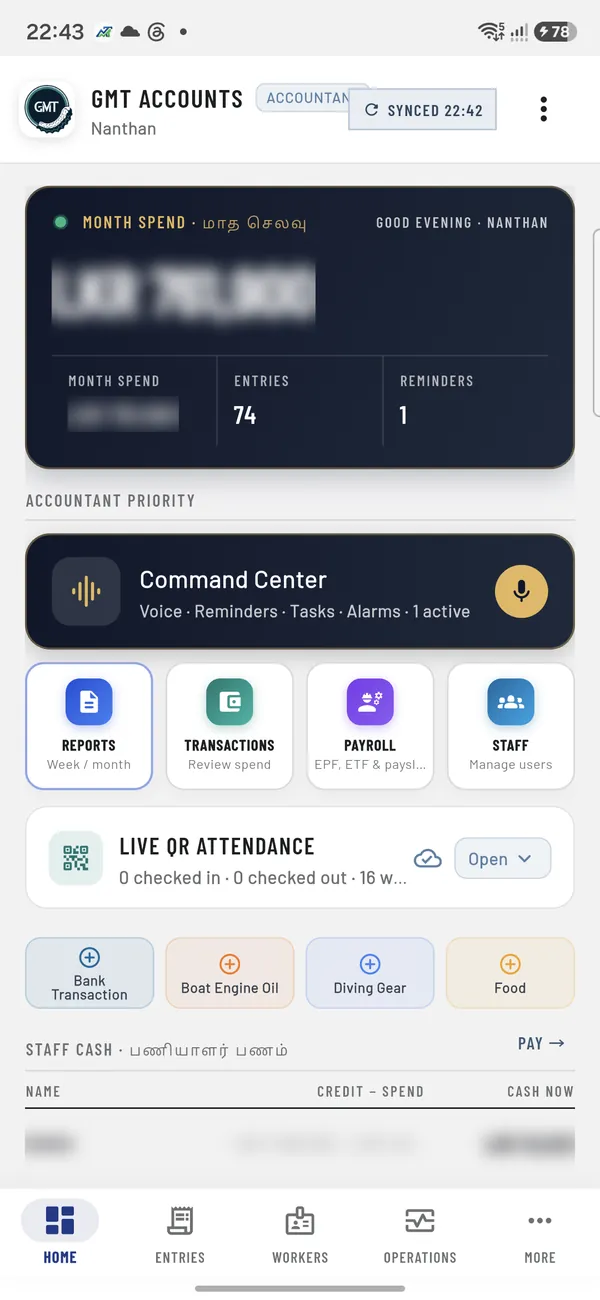
GMT Accounts home screen with the month spend card, Command Center, reports, transactions, payroll and staff tiles, and live QR attendance (amounts blurred)
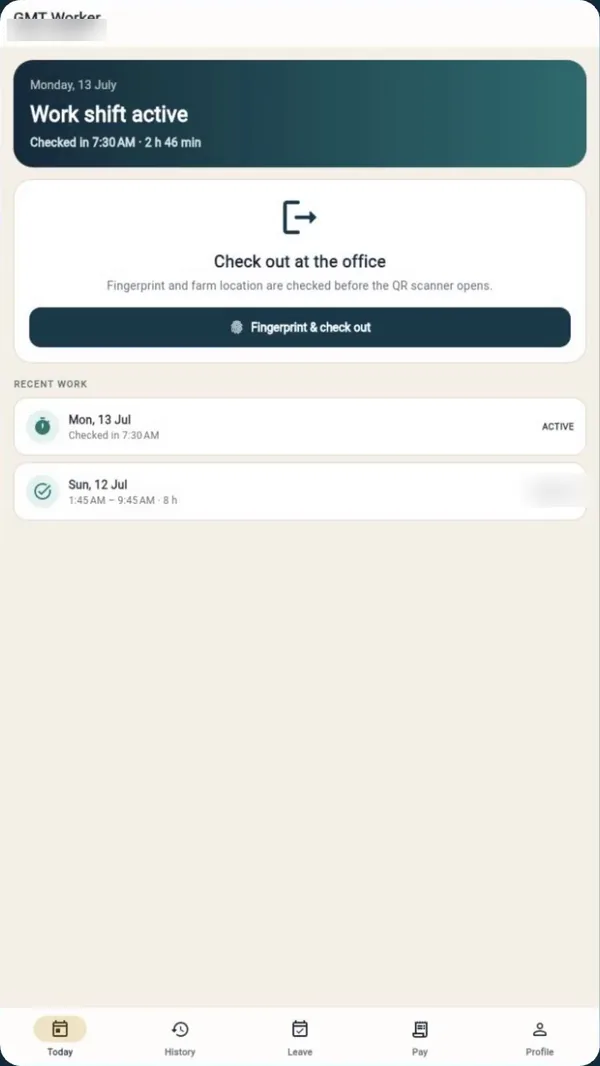
GMT Worker Today screen: work shift active, checked in at 7:30 AM, with the fingerprint and check-out button and recent work

A worker’s day with GMT Worker and GMT Accounts

  1. 01

    Activate the phone once

    The worker enters the Staff ID and PIN from the office and confirms with a fingerprint. The manager approves that phone in GMT Accounts. One worker, one phone.

    In the office appA new phone waits for approval.
  2. 02

    Check in with the farm QR code

    At the farm office, inside the 100 m farm zone: fingerprint first, then scan the permanent office QR. The server checks the approved phone, the place and a one-time code before the shift starts.

    In the office appLive QR attendance shows who is in, and since when.
  3. 03

    Hours count themselves

    The Today screen shows a live shift timer. During the shift the work phone records its location once an hour, so the office knows the team is on the farm. Nothing is recorded outside the shift.

    In the office appHourly location checks for each shift.
  4. 04

    Tasks ring the worker’s phone

    The office gives a task by voice or text. The worker’s phone rings with a task alarm; the worker accepts it and reports back.

    In the office appEvery task shows who has it and where it stands.
  5. 05

    Check out and report the day

    Scan the same QR to check out. Away from the farm? Send a check-out request with a reason for the manager. Then record a short voice report of the day, with a photo if needed.

    In the office appVoice reports and photos arrive in the field inbox.
  6. 06

    Hours become pay

    The office approves the timesheet. Hours flow into payroll with EPF and ETF, and the worker sees the payslip in the app once the month is locked.

    In the office appPayroll, payslips and staff cash in one place.
SNS-06 · WORKDAY VIEW
3D animation of the real app flow · not footage
Two apps, one system

One for the team, one for the office.

Both apps share one secure backend, so a check-in on a worker’s phone shows up in the office straight away.

GMT Worker app icon
For the team · Tamil first

GMT Worker

  • QR check-in and check-out at the farm office
  • Live shift timer and full work history
  • Task alarms and replies
  • Daily voice report with photos
  • Leave, advance and time-correction requests
  • Payslips as PDF
  • Works on weak signal: check-ins wait on the phone and sync later
GMT Accounts app icon
For the owner, manager and accountant

GMT Accounts

  • Month spend and cash flow at a glance
  • Every expense and payment in one ledger, with approvals
  • Voice assistant: speak an expense, payment, reminder or task
  • Receipt scan reads the bill for you
  • Staff cash, creditors, loans and advances
  • Live QR attendance and shareable attendance sheets
  • Payroll with EPF, ETF and payslips
  • Reports to PDF, CSV or WhatsApp, and spending analytics
Real screens

The apps as our team uses them.

Real, not animation. Tap a screen to see it full size.

GMT Worker app iconGMT Worker · for the team
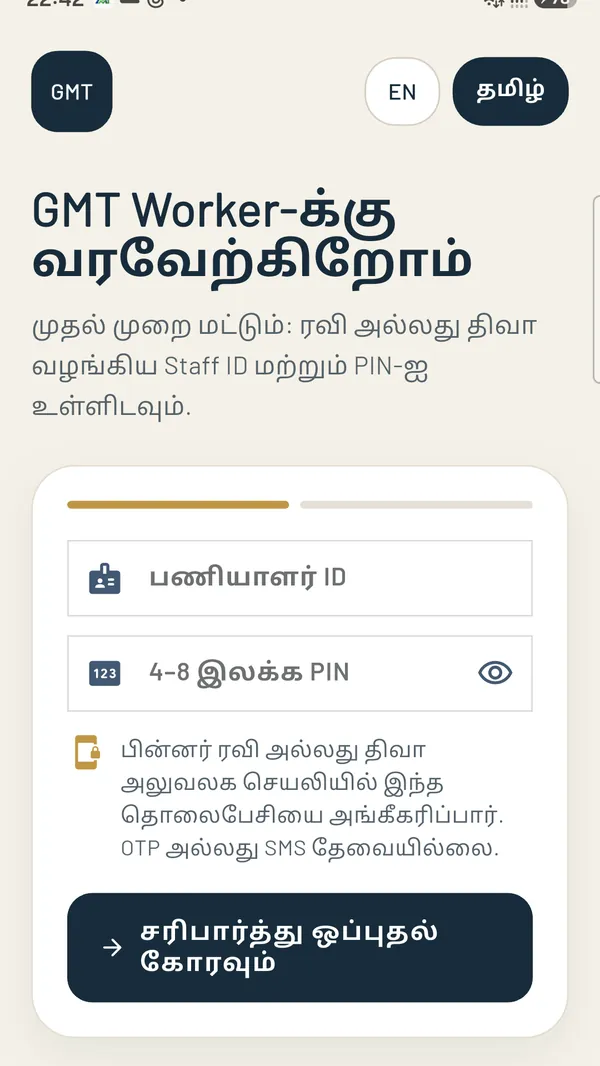
GMT Worker activation screen in Tamil asking for the Staff ID and PIN, with a note that the office will approve the phone
Activate onceTamil first: Staff ID, PIN, then the office approves the phone.
GMT Worker Today screen: work shift active, checked in at 7:30 AM, with the fingerprint and check-out button and recent work
TodayLive shift, and check-out at the office with fingerprint and QR.
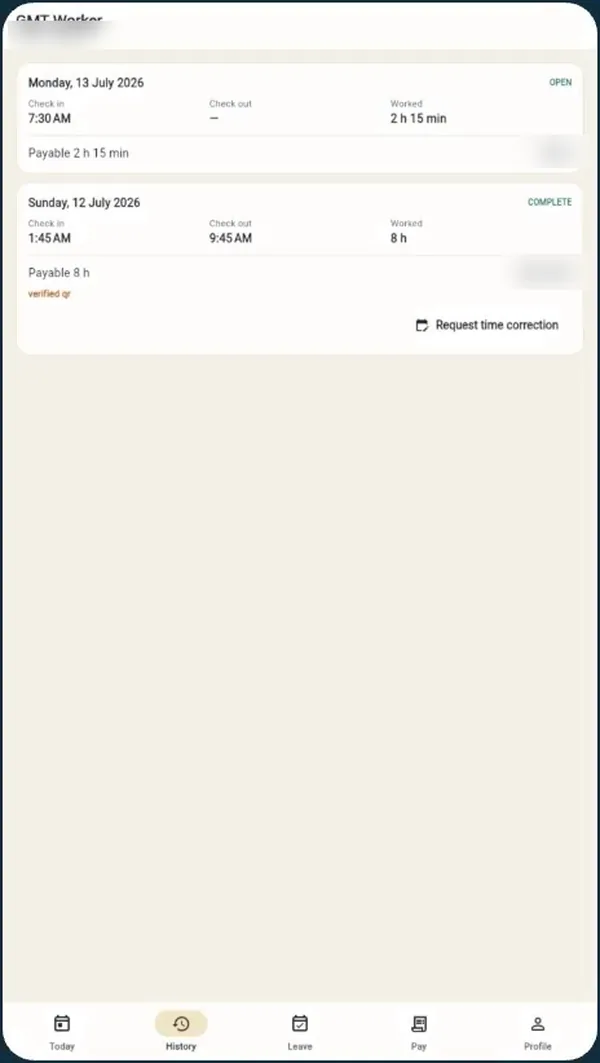
GMT Worker history screen listing each day with check-in and check-out times, hours worked and a request time correction button
HistoryCheck-in, check-out and hours for every day, QR-verified.
GMT Accounts app iconGMT Accounts · for the office
GMT Accounts home screen with the month spend card, Command Center, reports, transactions, payroll and staff tiles, and live QR attendance (amounts blurred)
Office homeMonth spend, Command Center and live QR attendance.
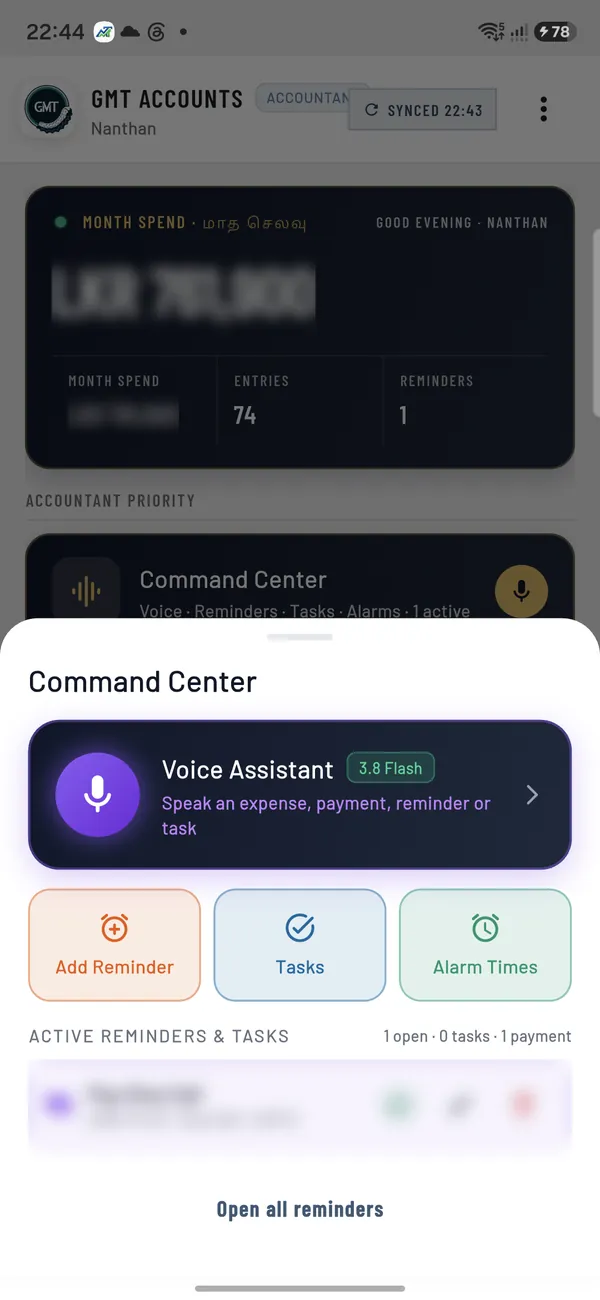
GMT Accounts Command Center with the voice assistant, add reminder, tasks and alarm times
Command CenterSpeak an expense, payment, reminder or task.
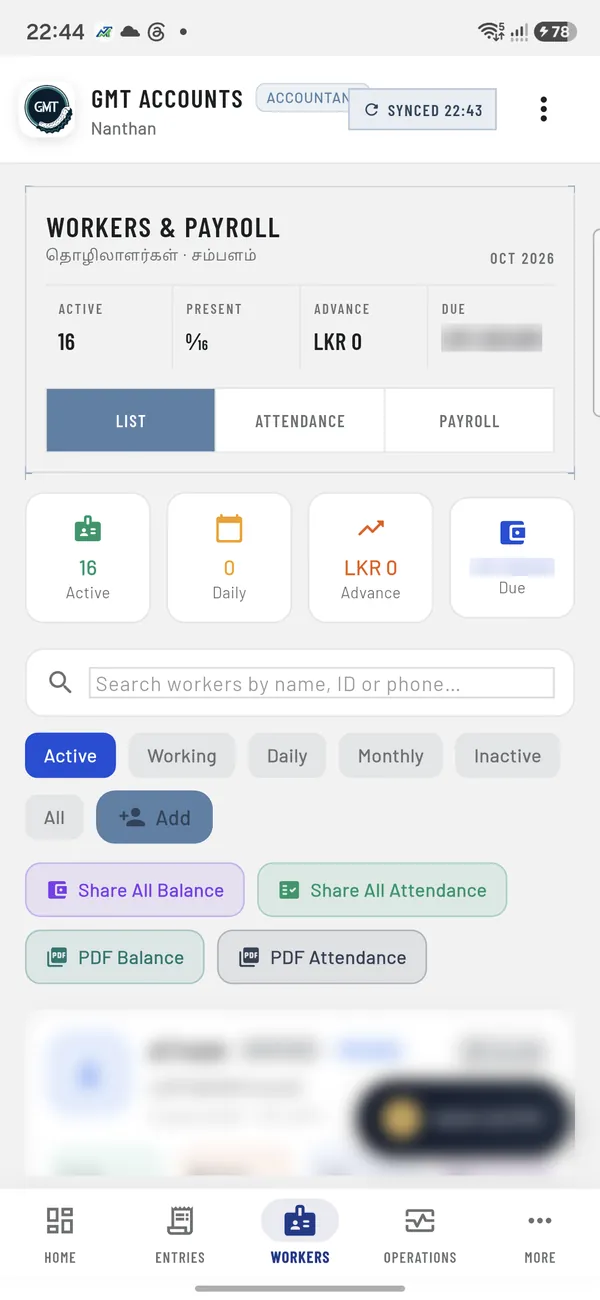
GMT Accounts workers and payroll screen with active, present, advance and due totals and share or PDF buttons (amounts and names blurred)
Workers & payrollAttendance, advances and dues for the whole team.
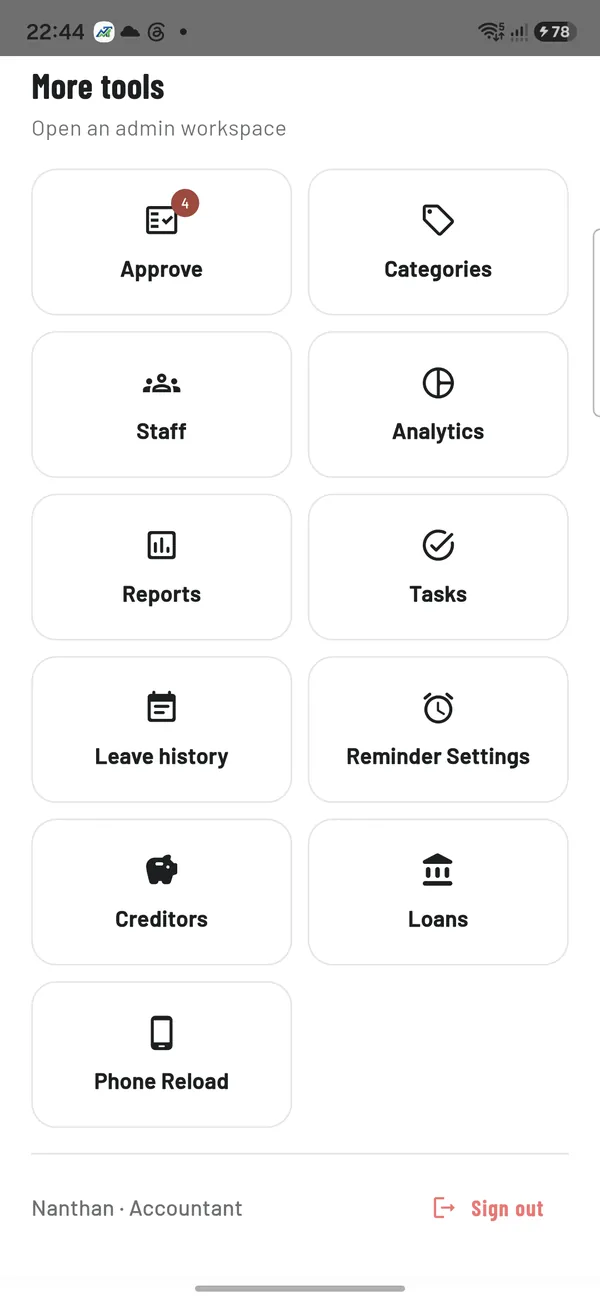
GMT Accounts more tools menu: approve, categories, staff, analytics, reports, tasks, leave history, reminder settings, creditors, loans and phone reload
All toolsApprovals, creditors, loans, reports and analytics.

Office screens were captured from the owner’s phone on 26 Oct 2026. Worker screens: the activation screen from the same phone, the others from the GMT Worker training guide. Names and money amounts are blurred.

Built for a real farm

Check-ins that cannot be faked, on weak signal.

Four checks at every check-in

The approved phone, the farm location, the fingerprint and the office QR must all match. The server confirms each scan with a one-time code.

PINs are checked on the server

Office and worker PINs are verified by the server, never stored on the phone. Each office user has their own role.

Weak signal is normal here

Check-ins and reports made offline wait on the phone and are marked for review when they sync. Payments are never queued offline.

Corrections keep the evidence

A worker can ask for a time correction. The manager decides, and the original record stays.

Questions farm owners ask

Phones, Tamil, location and signal.

Do the workers need their own smartphones?
Each worker uses one approved Android phone, and the office approves it before the first check-in. On our farm they are work phones.
Is the worker app in Tamil?
Yes. GMT Worker is Tamil first, with English one tap away. GMT Accounts shows Tamil labels beside English.
Is a worker’s location tracked all the time?
No. Location is checked at check-in and check-out, and once an hour during the shift. Nothing is recorded outside the shift.
What if there is no signal at the farm?
Check-ins and reports wait on the phone and sync when the signal returns; offline check-ins are marked for the manager to review. Payments are never queued offline.
Can we use these apps on our farm?
Talk to us. Each farm needs its own farm zone, office QR, staff list, roles and pay rules, and the team needs training in Tamil. We scope that with you first.
Start here

Show us your farm problem.

உங்கள் பண்ணைப் பிரச்சினையை எங்களுக்குக் காட்டுங்கள்.ඔබේ ගොවිපොළ ගැටලුව අපට පෙන්වන්න.
  1. We read itEvery enquiry is acknowledged and reviewed by an engineer.
  2. Free screening callFit, decision-maker and budget, in 15 to 20 minutes.
  3. Fixed-fee assessmentIf it fits, you get a quote for a site visit and measurements.

Type to search the whole site, in English, தமிழ் or සිංහල.

safenetcreations.com↑ ↓ · Enter · Esc